I spend the vast majority of my waking hours within the confines of my office.
Because of this, I've made it a point to make that fiefdom a place that I look
forward to walking into each and every day. If your interested, keep reading!
Desk space
When we moved into this home, I knew that I wanted my office to be an executive
style office; where the desk is in the center of the room and when sitting at
the desk, I am looking at the door. I have always thought this to be a cool
layout, and it provides the added benefit that nobody can sneak up on me
unprepared, and I get to see my kiddos being cute throughout the day (I have
windowed french doors).
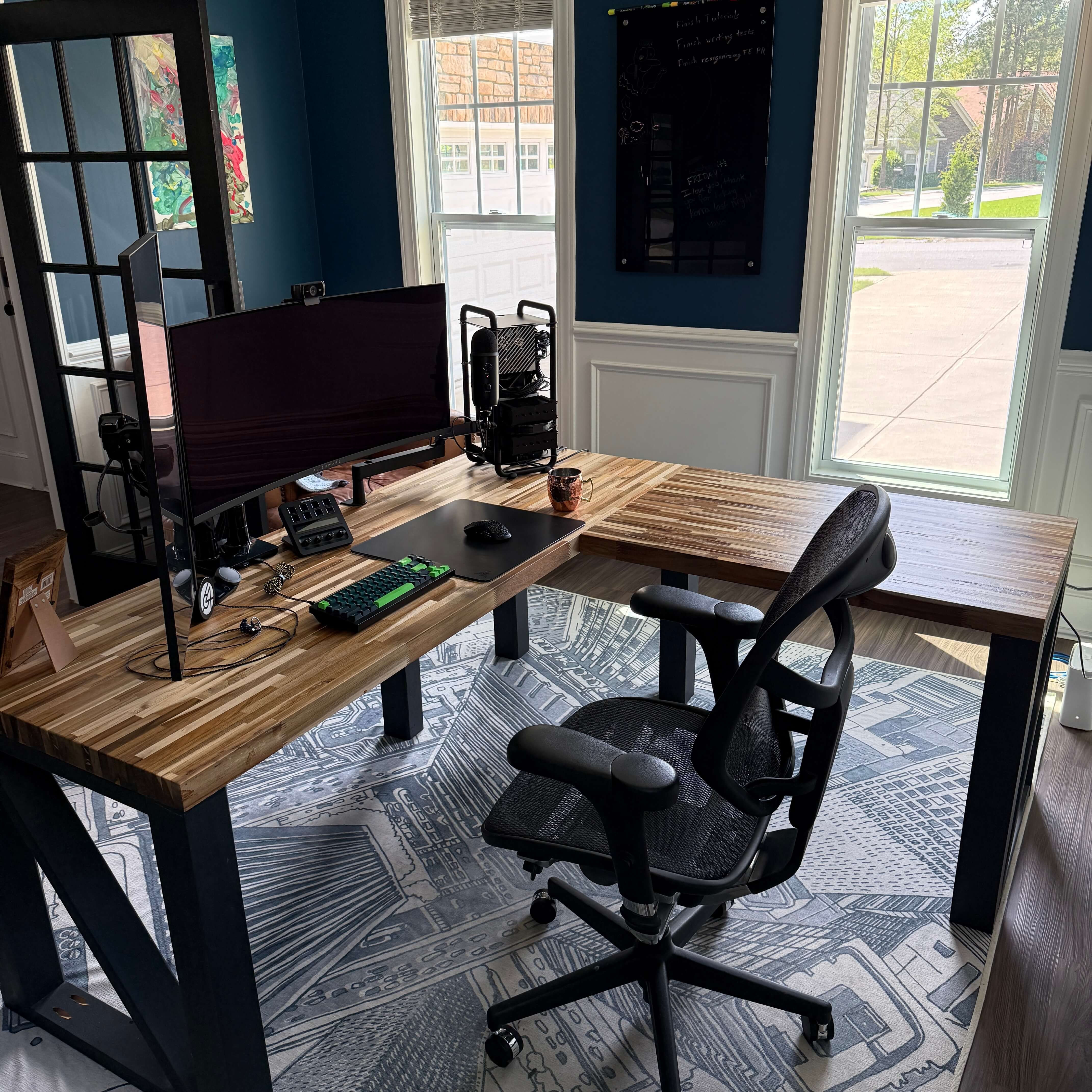
Custom office desk
The desk is a custom-built desk using 2.25 inch butcher block slabs that were
purchased from a reclamation center. It's an "L" shaped desk with the primary
portion measuring out to be ~75 inches and the secondary portion measuring out
to be ~60 inches; with the desk depth being measured out to 30 inches. The
height of the desk was measured out to my seating height at 32" - so if you're
a shorter person, this probably won't feel comfortable to you. This all makes
for a very large desk, and makes for a perfect workspace.
The primary portion is set up with my desktop, monitors and connected
peripherals. While the secondary portion is generally left clean and available
for taking notes, studying, tinkering, daydreaming and other non-monitor
focused activity. It's also open to the windows allowing me to take breaks
from staring at the screen and looking outside to look at nature (a.k.a. my
neighbors backyard).
Because the desk is set up in an executive style positioning, and because it is
an open backed desk, the cable management proved to be rather tricky - and it
doesn't help that I have so many peripherals and prefer to be hard-wired in (no
bluetooth for me).
If you're interested in the full build details and how I managed the cable
management, you can read more about it in my Building the Perfect Executive
Style Desk blog post.
Computer build
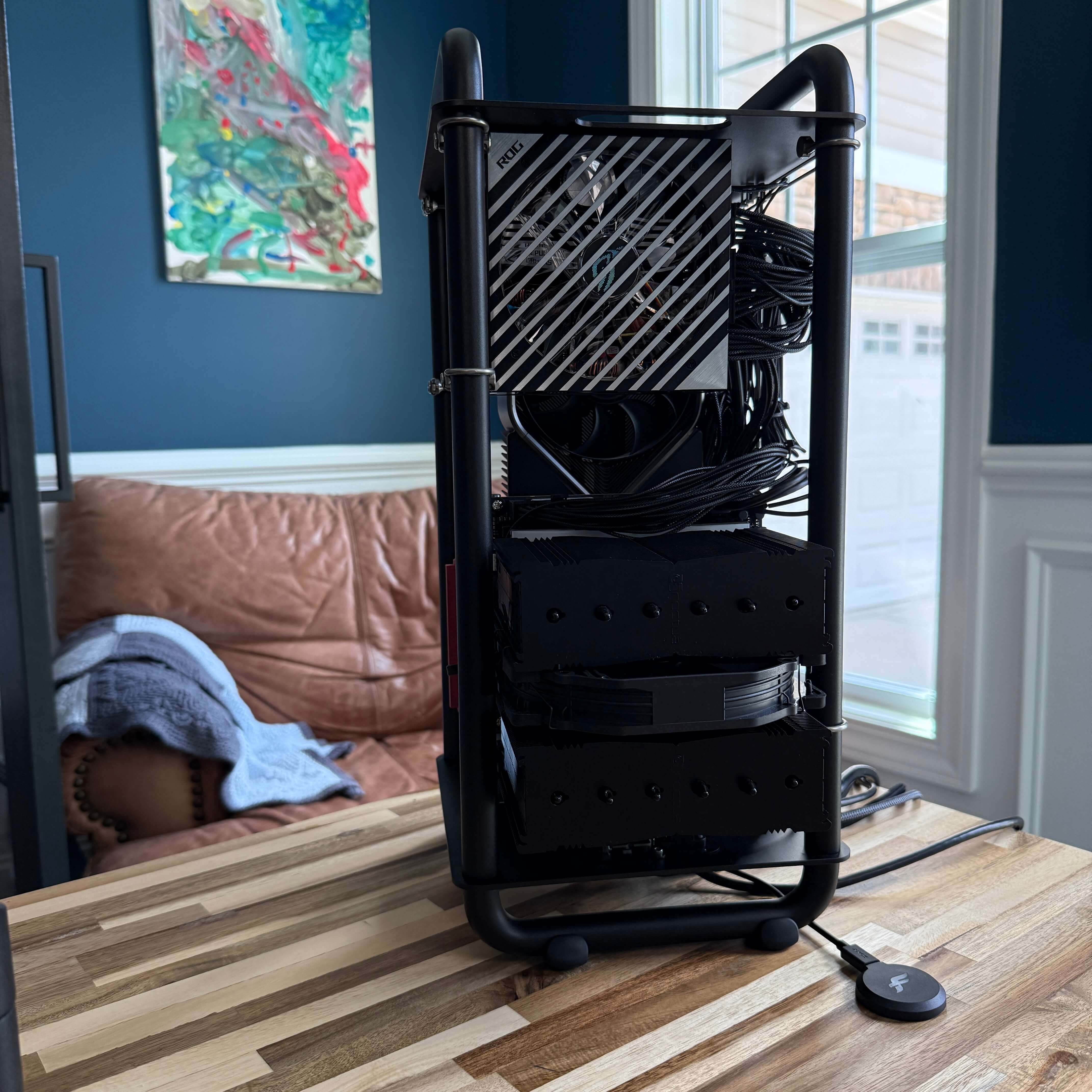
Streacom DA6 pc build
With my current build, I wanted to try something more unique than what you
would traditionally think of. I've been interested in doing a mini ITX computer
build for a long time. However, I also love my beefy, super performant
computers. And the combination of super beef and mini ITX doesn't mesh well -
at least not without serious customization and capital.
That is until I discovered the Streacom DA6 computer "case". It's actually a
21.5 litre, open-frame ITX case capable of housing practically any NVIDIA
flagship GPUs from any generation.
Because of the open frame design, I'm also not limited to the confines of a
traditional case; which means that my CPU cooler can extend outside the case
boundaries. While this is certainly a choice look, it's unique and the surface
area of the desktop is still quite small compared to traditional ATX tower
cases.
My operating system of choice is Linux. There is no better solution as a daily
driver for software engineering - with exceptions to game development and if
you're engineering for the Apple ecosystem (stupid Apple).
Specifically, I run Arch Linux as the operating
system, and I run Hyprland as my Wayland compositor
(graphical interface). Hyprland is a bit flashy and leans into the waifu
community - which isn't so much my flavor, I already have a sexy wifey - but it
is a very well-built Wayland compositor, and Wayland itself has become
increasingly more mature over the last year since I switched to Linux full
time.
Spit
Spit is a very simple, and
extraordinarily fast Git GUI. I am super comfortable with the command line and
traversing a git tree and logs, but sometimes you just need a GUI for the task
at hand. That's where Spit comes in nicely. It's not bloated, it is stupid
fast, and it provides all the data that I might need for trying to
contextualize whatever I am trying to solve.
Spit is a read only application (more or less), so if you're looking for
something with more power, you'll probably want to look elsewhere.
GitKraken is the most common one when
researching, but SublimeMerge is the one that
I have had first-hand experience with, and it is pretty decent as a
full-fledged utility application.
Alacritty
Until recently, I had been using Kitty. I decided to switch to using
Alacritty because I learned that Kitty had
a "phone home" functionality that could not actually be disabled, and I prefer
to be in full control over what happens within my terminal environment.
Alacritty is a very fast, GPU accelerated terminal interface. It is very
limited when it comes to bells and whistles, but is absolutely worth the
trade-off in terms of the performance gain.
Zeal Docs
I use Zeal as an offline documentation tool for
software development. This tool allows you to download the official
documentation for programming languages, frameworks and even common libraries.
It also allows you to generate and upload your own documentation for offline
reading. Zeal is built on top of Dash which is a Mac
only application.
Official documentation has become an essential resource for myself as I've
grown as an engineer. It might sound like a stupid statement, but what I mean
by that is that StackOverflow and [name your AI here] can only get you so far
if you don't actually take the time to understand what the underlying code is
actually doing. Zeal is a tool that allows me to quickly and easily access
that official documentation.
AFFiNE
AFFiNE
is a new tool in the toolchest that I have come to really enjoy, and I am
looking to depend on as I use it more and more. Prior to AFFiNE, I tried using
Excalidraw and Miro for drawing out thoughts and concepts - white-boarding
essentially - but I had issues with both. I also tried Notion and other
note-taking applications, and I simply had issues with everything I tried.
Which led me to just not using them because I didn't like the experience.
So far with AFFiNE, I haven't had any of those issues. I really enjoy the
experience. It is less focused than Excalidraw (simply being a drawing board)
and Notion (originally just being a note-taking app), but the way the
whiteboarding and the note-taking all meshes together is really nice and I have
found great value coming from it.
I appreciate it for its local first mentality and for the ability that I have
to host it myself should I choose to make use of its cloud functionality.
AFFiNE is built on BlockSuite, among other open-source libraries, and I have
not tried BlockSuite directly to determine of that is all that I actually want
instead of having the possibility of getting vendor lock in with AFFiNE, even
if it is open source and all.
Neovim
It's fine. You can say it. I am a member of the Neovim
cult. But hear me out! This editor is incredible. It does exactly what I want,
because I configured it to do so.
Since I switched from Jetbrains to Neovim I have noticed two specific things:
(1) the speed at which I can navigate a codebase and make changes as increased
significantly; (2) my memory for the codebase has increased as well - I am far
more connected with where specific code is, what it's purpose is and how it
operates.
Opencode
Opencode. Ohhh, how I love a well engineered tool. How
one interfaces with AI varies from person to person dependent on how they think
and how they approach each problem. For me, Opencode gives me a singular
location where there is singular focus for what I am architecting, and it
provides the exact interface I need for understanding what the agent is doing.
Peripherals
I am a man of many peripherals. Though, with my recent computer build, I did a
major cleanup of my workspace so as to avoid the feeling of clutter and to open
it up a little more. This included a removal of a third monitor, in favor of a
two monitor setup. This was enabled because of the environment I have
configured on linux.
If you're interested in what I use on a daily basis, below contains a list and
short description. I'll provide a link to the products as well.
Alienware 34" OLED monitor
As my primary monitor, I have a 34" Alienware oled
monitor. It is fantastic! Though, I have had it for a
while and there are probably better options today - Asus generally being the
best go to for their oled panels.
Philips 4k monitor
As my secondary monitor, I run a 28" Philips 4k
monitor. This is a great secondary monitor, and I use
it in a vertical stance for passive content (slack, music, etc.).
Dactyl Manuform
Wooden Dactyl Manuform
My primary keyboard for non-gaming activity is a custom designed and 3d printed
by myself. I found some "wooden" filament that I used for the print which gives
the encasing a textured feel, and I spent a lot of time trying to find some
wooden styled keycaps. I first looked at actual wood keycaps, but I couldn't
seem to find any within a reasonable price or that didn't look sketch.
Currently, these have Glorious Kailh Speed
Silver
mechanical switches. With the hollow case though, these don't sound terribly
great, nor do they give the same kind of bounce as the ones in the Keychron Q2
QMK I was using previously. I intend to swap these switches out for some
Gateron Quinn switches which have an amazing feel on these 3d printed
keyboards.
Keychron Q2 QMK
Keychron Q2 QMK
My primary keyboard for non-gaming activity is a custom 65% Keychron Q2
QMK
mechanical keyboard with Keychron K
Pro
silver switches. I generally appreciate a shorter pre-travel and travel
distance and a lighter operating force, and these are perfect for the job. I've
matched the case and the switches with a set of dark and light green
double-shot pbt keycaps that make for a great aesthetic.
Wooting 60He
Wooting 60He
My primary gaming keyboard is a Wooting
60He. In my opinion, this is the best
keyboard for gaming that is out there. It is super responsive and feels great
to play on. The resistance in the keys, while also being able to set the
activation point is absolutely perfect. However, for me, it genuinely does not
feel good for long typing sessions. For typing, I much prefer mechanical
switches.
Finalmouse UltralightX (ULX)
My primary mouse is a Finalmouse UltralightX. It is very lightweight, weighing
in at only 36g. It's battery life is exceptional, requiring a charge about
every 10 days (while being my primary mouse 10+ hours a day).
Razer Atlas mouse pad
My mouse pad is the best! I have a Razer
Atlas tempered glass
mouse pad. Again, this is one of those purchases where I have come to really
love it and don't expect to go back to a traditional, cloth mouse pad anytime
soon.
Blue Yeti
For a microphone, a simple but perfect for what I need Blue
Yeti.
This is on a low profile Elgato
Wave mic arm.
64Audio A6t IEMs
One of my all-time favorite purchases these 64Audio
A6t custom molded IEMs! I have never had
an earphone feel more comfortable and sound better than these - though I'm sure
their higher end might prove that statement wrong. These were quite pricey, but
I do not regret the purchase in the slightest. In fact, I tell my wife pretty
frequently how much I love this purchase. I live 6+ hours with these earphones
in each day and if it weren't for the inability to hear my kids playing, I
wouldn't even notice they were in my ears.
These were custom molded, requiring that I go into an audiologist and get ear
molds that I had to send in to 64Audio for them to craft the IEMs around.
WorkPro Quantum 9000
I sit a lot! It is the largest downside to having built a custom desk that
doesn't allow for standing. But, regardless, much of my life is spent sitting.
I have tried many chairs, and so far the only one that I have had for longer
than a yar is the WorkPro Quantum
9000
series ergonomic chair. It's nothing fancy, but I have never felt any pain from
sitting in this chair - achiness due to long sit sessions and neglect for my
body's need to stand and get even a little bit of exercise, sure; but never any
pain.